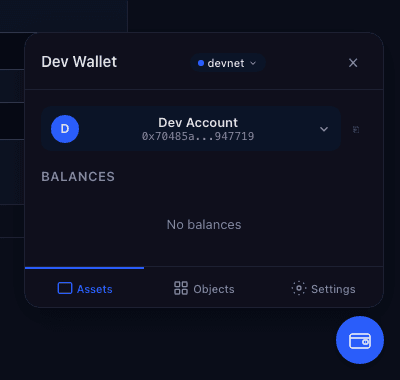
Dev Wallet
A development-only wallet for building and testing Sui dApps — no browser extension required.
This wallet is for development and testing only. Do not use it to store real funds.
Pre-1.0: This package is under active development. Minor versions may contain breaking changes until the API stabilizes at 1.0.
Use cases
| I want to... | How | Details |
|---|---|---|
| Connect a wallet to localnet or a custom network | Built-in — devnet, testnet, localnet included by default. Pass custom URLs via networks config. | Getting Started |
| Test my dApp end-to-end without click-through approvals | Set autoApprove: true | E2E Testing |
| Keep a persistent dev wallet that survives page reloads | Use WebCryptoSignerAdapter — keys stored in IndexedDB, survive refresh and restart | WebCrypto adapter |
| Sign with the same address I published contracts from | Use standalone wallet + RemoteCliAdapter | CLI Signing |
| Share one wallet across multiple dApps | Run standalone wallet, register in each dApp | Standalone Mode |
| Build a demo app users can try without installing a wallet | Set autoConnect: true, mountUI: true — wallet embeds directly, no extension needed | Getting Started |
| Prototype fast with zero setup | Use WebCryptoSignerAdapter with defaults — three lines of config | Getting Started |
| Keep dev keys separate from mainnet credentials | All adapters are isolated from production wallets by design — keys are ephemeral or browser-scoped | Adapters |
Quick Start
Embedded in your app (dApp Kit plugin)
If your app uses @mysten/dapp-kit-react, embed the wallet directly — it inherits your network
config automatically:
import { createDAppKit } from '@mysten/dapp-kit-react';
import { devWalletInitializer } from '@mysten/dev-wallet';
import { WebCryptoSignerAdapter } from '@mysten/dev-wallet/adapters';

const dAppKit = createDAppKit({
	networks: ['devnet'],
	walletInitializers: [
		devWalletInitializer({
			adapters: [new WebCryptoSignerAdapter()],
			autoConnect: true,
			mountUI: true,
		}),
	],
});
Standalone wallet
Run the wallet as its own web app — your dApp connects via popup, just like a production wallet.
Start the server, then register it through walletInitializers:
npx @mysten/dev-wallet serveimport { createDAppKit } from '@mysten/dapp-kit-react';
import { devWalletClientInitializer } from '@mysten/dev-wallet/client';
const dAppKit = createDAppKit({
networks: ['devnet'],
walletInitializers: [devWalletClientInitializer({ origin: 'http://localhost:5174' })],
});The default port is 5174 (Vite's default). If the port is busy, Vite picks the next available — check the terminal output. See Standalone Mode for details.
How it works
Dev Wallet implements the wallet-standard interface (sui:signTransaction,
sui:signAndExecuteTransaction, sui:signPersonalMessage) and registers itself in the
wallet-standard registry. It appears in dApp Kit's wallet picker alongside production wallets.
Key management is handled by pluggable adapters — InMemory (ephemeral), WebCrypto (persistent), Passkey (biometric), and Remote CLI (sui keystore). See Adapters for details.
Guides
- Getting Started — installation and first setup
- E2E Testing — automated testing with auto-approval
- CLI Signing — sign with your contract publish address
- Standalone Mode — one wallet across multiple dApps
- Reference — adapters, APIs, and architecture